Zoho Recruit and process optimization by the experts of Interloop can help you close the hiring loop for your organization. This will make your recruitment process automated quickly and effectively.
Zoho Recruit is designed keeping in mind the needs of the corporate world and staffing agencies. Few features are added to the staffing version to take care of its vast and elaborated needs. We understand your needs and we are all ears to our customer needs, hence, separate versions for different needs.
Corporate version of Zoho recruit gives you access to the vendor portal which allows sharing job alerts with the vendors. Whereas the staffing version gives you access to the client portal, this helps the staffing agency share resumes with their client in an easy way.
Staffing version also allows you to schedule candidate interviews on behalf of their corporate clients. The interviewer can be picked from the contact module of the staffing version.
Corporate version allows you to enjoy seamless connectivity with Zoho people (HRIS). The selected candidate’s information flows to the Zoho People onboarding section. The corporate version has open API’s which can be used to integrate it with any other existing HRIS.
Approval Forms Configured
Approval Forms Configured
You can automate Zoho Recruit to a very advanced level using the blueprint feature of Zoho ATS. Zoho Recruit blueprints help the recruiters to follow a systematic approach starting from associating a candidate to a job opening, submitting it to a hiring manager, sending out assessment links, scheduling interviews and finally getting appropriate approvals before sending out an offer letter.
Blue Print feature is a flowchart designed as per the organizations’ hiring process. The flowchart has points where decisions need to be made by the recruits and other relevant decision makers, for example hiring manager, management team. Depending on the decisions, the next step is automatically determined, we call this decision stages transaction stages.
All the automated alerts and workflows are superimposed over the workflow making it an advanced level of automation. Once the decision is made the alerts are automatically sent out, the task can be assigned, fields update can be made. Blueprint also makes sure that nothing is missed out. When the decisions are made by recruiters, at every relevant stage comment and important information are asked to be filled up by the system, making sure that record-keeping is correctly done.
Approval Forms Configured
Approval Forms Configured
Resume parsing is the bread and butter of any ATS and Zoho Recruit has various options for this. Have a huge candidate database or people sending resumes directly on email? No Problem! Zoho Recruit helps you import resumes in bulk. You can also forward the resumes to Zoho Recruit Email, system will parse and add them to Candidate Module.
You can automate resume parsing via email. All the resumes received on your career email ID can be automatically parsed to Zoho Recruit making sure you do not miss out anything.
You can use the power of resume extractor, which is a google chrome plug in. This works across any portal be it LinkedIn, Naukri.com, Monster.com etc. Just select the resume you want to add to your candidate database and hit the plug in. The resume will automatically land up in your ATS candidate database.
There is an outlook plug in also available for resume parsing, any email that you receive in your inbox. Just click on the plug in and the resume gets added to your candidate database, directly from outlook.
Approval Forms Configured
Approval Forms Configured
Candidates can apply using their Linkedin profiles. This can be enabled when you have a LinkedIn recruiter account. You can create a seamless application process through LinkedIn to avoid the application hassle for the applicants. Import candidate details from the LinkedIn profiles of the candidates and sort applicants based on standard fields parsed from LinkedIn.
Approval Forms Configured
Approval Forms Configured
Zoho Recruit comes with its career site which can be customised as per your needs. You can use this site for creating job alerts, publishing job descriptions and applications. You can also create multiple career sites for different purposes like Campus Drives or General Hiring.
Creating career sites that are SEO friendly will also bring in a greater talent pool to the job postings. Employer branding can be done by customizing the portal as per the organizational core values and embed the same onto the company website.
Approval Forms Configured
Approval Forms Configured
With 40+ pre-built reports and customisable dashboards, you will have a complete view of the activities, performance and candidates in real-time. You can also create your ports and dashboards for your specific needs.
To make informed business decisions and to understand the performance of various job boards, analysis of the data points such as hire to convert ratio, hire versus reject ratio and many more are provided with this application.
Activity dashboard, the user-specific dashboard gives the recruiter a bird’s eye view of all the elements of the recruitment cycle.
Approval Forms Configured
Approval Forms Configured
Stage-01
Job Creation
How creatively you put together a Job Description is critical to grabbing the attention of a good candidate. As a part of the talent acquisition process, creating a job alert is the first touchpoint with the candidate and it forms the image of the employer brand at the same time. Taking inspiration from the sample profile you are looking to get, design your description accordingly.
Approval Forms Configured
Approval Forms Configured
Job opening via templates
The Job Template feature can be used quickly to create a new opening.
Skill set for job opening
The Job Module also has a skill set option. Helps identify the right talent in 5 sec with the power of AI. The job opening module is customizable and more information files can be added for the recruiters to get the right set of information to close the position.
Approval Forms Configured
Approval Forms Configured
Approval Forms Configured
Approval Forms Configured
Approval for new jobs
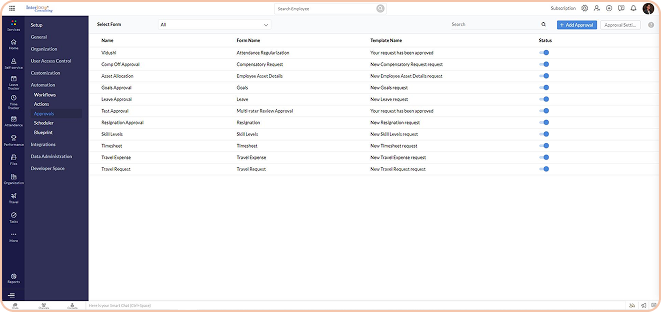
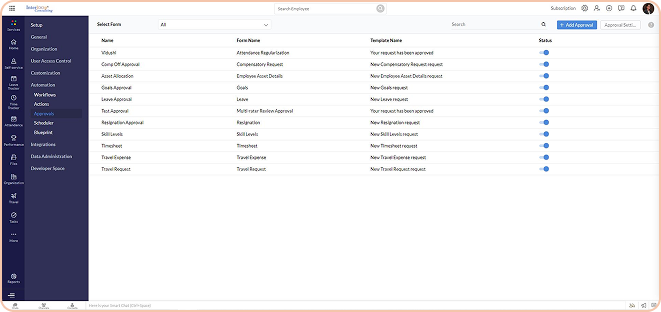
Approvals can be configured once the Hiring manager posts the job opening. You can create criteria-based job approvals. For example, when there is a salary above 12L/Anum, the director of finance needs to approve.
Pre-assessment
You can add pre-assessment when you create a new job opening.
Approval Forms Configured
Approval Forms Configured
Stage-02
Listing on website & jobs boards
Once the job has been created and approved it can be published on various job sites and company websites. This helps you spread the word quickly. Zoho Recruit also gives you an option to create your career site.
Approval Forms Configured
Approval Forms Configured
Job posting on multiple platforms
You can publish jobs on LI and Indeed allowing the candidate to apply directly.
Customized career site creation
You can create multiple career sites depending on Geographic.
Approval Forms Configured
Approval Forms Configured
Stage-03
Candidate Sourcing
Once the job is created and published the candidate database will become rich and this will help you find the right candidate. There can be multiple sources via which you can collect candidate applications.
Approval Forms Configured
Approval Forms Configured
Vendor Portal
Zoho Recruit gives you the option to configure and allow your recruiting vendor to be a part of your recruitment process directly. You can control which job opening needs to be shared with which vendor.
Career Site
Candidates visiting the organizations’ careers section can also apply for an open position and the candidate details will directly land up on Zoho Recruit. Also, the candidate will get associated with the job opening.
Approval Forms Configured
Approval Forms Configured
Approval Forms Configured
Approval Forms Configured
Apply via LinkedIn
Apply via LinkedIn is free of cost (please check for updated policy). It is a great way to get a candidate from LinkedIn. Job seekers can see the open position on your LinkedIn’s company page and can directly apply from LinkedIn.
Candidate Portal
A Customized candidate portal can be a top-notch step to enhance candidate experience during the hiring process. Also, it’s a brand-boosting exercise. Candidates can apply for a new job from the portal and also update their information which is in sync with the Zoho application tracking system (ATS).
Approval Forms Configured
Approval Forms Configured
Approval Forms Configured
Approval Forms Configured
Resume Extractor
One of the best ATS with XXX number of users comes with a google chrome extension to parse any resume from any portal to Zoho recruit. You can simply select the resume and hit the extractor icon and the candidate information will be parsed.
Resume Inbox
You have a dedicated email address to configure auto-resume parsing via emails. You can map your official career email to the resume parsing email id and all the resumes can be parsed automatically.
Approval Forms Configured
Approval Forms Configured
Approval Forms Configured
Approval Forms Configured
Employee Referral
Zoho Recruit also comes with an employee referral section for employees to refer to a right fit candidate.
Stage-04
AI-Assisted Candidate search
There can be thousands of resumes from various sources. There are various tools in the Zoho Recruit system to find the ideal bunch of candidates for submitting it to the hiring manager and process the candidature. Once the right candidates have been found, they can be associated with the job opening and it starts reflecting in the hiring pipeline.
Approval Forms Configured
Approval Forms Configured
Job posting on multiple platforms
You can publish jobs on LI and Indeed allowing the candidate to apply directly.
Boolean search
Boolean search enables you to use AND, OR, NOT to limit, broaden and define the search results. It is quick to find relevant candidates in a few seconds.
Approval Forms Configured
Approval Forms Configured
Approval Forms Configured
Approval Forms Configured
Advance Search tool
Advance Search tool is an amazing search option that you can save and any recruiter can use it when there is a similar job opening in future. In advance candidate search you can combine various search elements in one search like skill set, location, experience, salary etc.
Stage-05
Assessments
Once the job is created and published the candidate database will become rich and this will help you find the right candidate. There can be multiple sources via which you can collect candidate applications.
Pre-assessments
Use pre-screening assessment to carry out the talent acquisition process by creating a job opening. You can put qualifier questions and a candidate who fits the criteria will be the one making it to your screening pipeline. This saves a lot of time, reducing recruiters time to hire. Also, you can access a candidature on the responses they have shared.
Approval Forms Configured
Approval Forms Configured
Approval Forms Configured
Approval Forms Configured
Interview assessment
During the interview, it’s a tendency that questions and parameters to access a candidate do not remain standard. This can be because of various reasons like different dates of interview, bad mood, prejudice etc. Interview assessment is a guiding tool that helps the interviewer conduct a good interview with a standard yardstick.
Stage-06
Multi-level Interview Process
Hiring is a critical decision for any organization. To make sure that you hire the right human capital interview is an essential step. There can be multiple interviews conducted for a candidate. It is possible at a time there could be a panel interview. The hiring module gives you the flexibility to conduct various types of interviews. 1 – Face to Face 2 – Recorded Interview 3 – Online 2-way Interview
Automated intimation of interviews
Once the interview is scheduled the candidate and interviewer(s) receive an email notification with all the details of the interview, which includes time date and meeting link. Also, the email to the interviewer(s) contains the CV & Cover Letter attached.
Approval Forms Configured
Approval Forms Configured
Approval Forms Configured
Approval Forms Configured
Stage wise view of the interviews
Our technical experts do amazing work on linking the interview stages with hiring stages making it totally in sync with the hiring process. When you schedule interview Level 1 or Final Interview it reflects the same on the hiring pipeline with the number of candidates scheduled for that interview.
Quick change or cancellation
When and if the interview gets rescheduled or cancelled all the communications are automated and everyone receives a timely alert.
Approval Forms Configured
Approval Forms Configured
Approval Forms Configured
Approval Forms Configured
Captures real-time interview rest all are fine
As all the interviews have attached feedback forms, real-time interview feedback can be submitted by the interviewer. The recruiter receives an email alert with the summary and they can take the next steps.
Stage-07
Background Check initiation
Background verification is an important part of hiring. You can create a custom workflow to share the candidate information with the client. Zoho Recruit can also be integrated with any third-party agencies using pre-built integration or APIs. All the details will go to the vendor as per the fields set out by you in the candidate hiring pipeline. The vendor can accordingly carry out the background check. If the vendor has the APIs, they can push back the same report to Zoho Recruit.
Approval Forms Configured
Approval Forms Configured
Stage-08
Offer letter with e-sign
Approval Forms Configured
Approval Forms Configured
You can share the offer letter with selected candidates directly from Zoho Recruit. This can be shared for email acceptance or E-sign with the candidates. You can customize the offer letter with your logo, content and structure. To enhance your candidate experience, at the click of a button, extend the offer letters to the candidates. Create custom templates so that you save up on time while extending the offer letters to the selected candidates as well as in receiving their acceptance. You can also keep a status check on the extended offer letters.
Stage-09
Push to Zoho People/HRIS
There is a direct integration between Zoho People & Zoho Recruit. You can convert the hired candidate to an employee by pushing the data to Zoho People – at a click of a button! Recruitment cycles get completed here.
Also, if you directly want to initiate onboarding our technical expert can help you achieve this with advance level of coding.
Once you have a candidate who has accepted you offer letter you can move them to initiate pre joining process. Once you do this the candidate details will be automatically added to candidate onboarding section of Zoho people. And from Zoho people you can trigger onboarding.
And once the candidate is converted to an employee during the step, you can select candidate status as joined and the status in Zoho Recruit also gets update into “joined”.
In case the candidate is a no-show on date of joining, you can update in the onboarding section of Zoho people which gets update again in Zoho recruit.
Approval Forms Configured
Approval Forms Configured
INTEGRATIONS
Zoho Apps
Featured Integrations
Business
Zoho People FAQs
How can we choose which variant is suitable for us?
Yes, Zoho People can be integrated with other solutions such as Quick Books, Adobe Sign, Docu Sign, Google Calendar, Zapier, XOXO day, Microsoft. You can also use Zapier to integrate with various tools. Apart from them, check the integrations section for more information about the same.
Can I upgrade or downgrade to different plans mid-year?
It’s important to pick the right variant that helps you strike the balance between investment and organizational needs. You can take our need assessment, scope of work and feature list to pick the right variant for your organization.
How do we manage contract or blue-collar employees (Drivers, Security Staff etc.) in Zoho People?
Zoho people has employee profile features, that can be used for blue-collar employees. These licences come at a very nominal fee. They do not get access to the system, however their attendance and leave data along with their personal data can be maintained.
Can we integrate Zoho People with other solutions?
Zoho people has employee profile features, that can be used for blue-collar employees. These licences come at a very nominal fee. They do not get access to the system, however their attendance and leave data along with their personal data can be maintained.
Do you have AMC? Is it compulsory?
No, AMC is not at all compulsory. We believe that our training will help the HR team to handle the system all by themselves. We provide L1 & L2 level training for HR Professionals. If at all you still want to opt for AMC our team will be happy to provide you an option.
Can we implement Zoho People ourselves? What support will you provide in this case?
Implementing Zoho people by yourself can be a tedious task especially if you’re not a certified professional. It might take more time and you might not be able to use the system exhaustively. Still if you want to do it by yourself, we can provide you with Interloop’s admin guide for Zoho People. To avail this you must tag Interloop as your partner.
Can we integrate biometric machines with Zoho People?
Yes, you can integrate biometric machines with Zoho People, Zoho People Support, MS Access and SQL database for integration.
Can we manage group companies or different legal entities in Zoho People?
Yes, you can manage the subsidiaries, sister companies in Zoho People spread all across the globe. This feature is available only in the enterprise version of Zoho people.
Get in touch to begin your ZOHO journey!
Contact us today to learn more about how we can help you achieve your business goals.