Every organisation aspires to achieve a positive and progressive employee performance management system. It becomes very efficient when technology helps you to achieve it. Evaluate your employees’ performances with various reports across the platform. Assign Key roles to employees, skill sets to have a better understanding of their skill set, and their performance. easily set up periodic appraisal and self-appraisal with top HRMS features. Know the strengths and weaknesses of your company with detailed reports of performance management. Generate skill set matrix, 9 box grids, which are very useful when it comes to planning a development strategy for your organisation. Become the best HR for employees. With the newly added feature of mobile access, daily performance management becomes efficient, working on tasks becomes easier and you get better control of your workforce.
Deciding your holiday list well in advance along with some restricted holidays if applicable. Depending on the office location, you can customize your holiday list as per the specific location and shift.
Step-02
Create Unlimited Leave types
Keeping employee wellbeing in mind an organization can have various types of leaves eg casual leave, sabbatical, paternity, hours based leaves etc. ZP can accommodate as many leave types as you have. You can also configure unpaid leave type
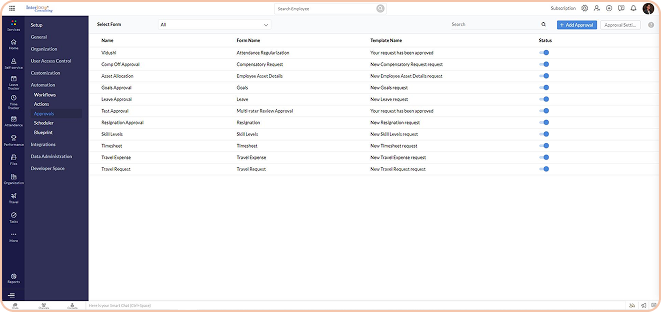
Approval Forms Configured
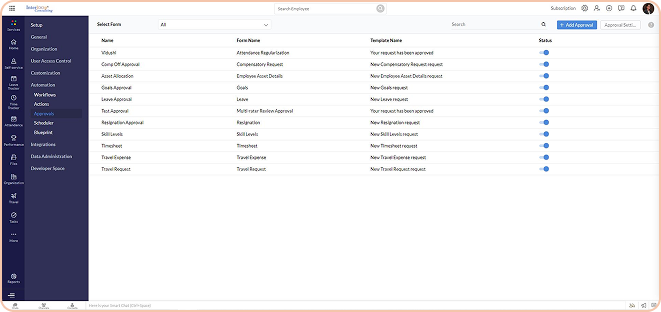
Approval Forms Configured
Approval Forms Configured
Approval Forms Configured
Step-03
Pro-rated policies are applicable
You can lay out the prorated policy on Zoho People based on the slabs, days, round off, months.
Step-04
Clubbing and Sandwich policy
You can configure various restrictions for any leave. You can decide if you want to include the weekends or holidays as leaves or not. Also, you can restrict if any leave type can’t be taken with any specific leave. For Eg, Privilege leave can’t be taken with Sick Leave.
Approval Forms Configured
Approval Forms Configured
Approval Forms Configured
Approval Forms Configured
Step-05
Manage the Leave Frequency policy
Zoho People gives you an option to configure accrual frequency, you can grant leave count yearly, monthly, weekly based. You can also configure based on the date of joining, the month of joining etc.
Step-06
Mange Compensatory Off
The compensatory request can either be enabled or disabled for all. You can set the number of leaves to be credited when the work is done on a weekend versus when done on weekdays along with the approval flow.
Approval Forms Configured
Approval Forms Configured
Approval Forms Configured
Approval Forms Configured
Step-07
Design employee-specific policies
Apart from the leave policies applicable to all, you can create new policies as per each employee if needed. You can also decide on leave count based on seniority.
Step-08
Configure multi-level approvals
You can create an approval mechanism for all kinds of leave requests replicating the structure that was being followed in your organization on Zoho People. As for new leave requests, you can define who approves which request and by what time.
Approval Forms Configured
Approval Forms Configured
Approval Forms Configured
Approval Forms Configured
Step-09
Customize criteria based approvals
In case, there are some leave types which if not approved by the concerned manager can henceforth be granted to the employee, it can be customized on this HR Leave management software. TAT settings are also available for the leave module.
Step-10
Comprehensive leave reports
For analysing the data retrieved from the entire workflow of the leave module on Zoho People, you can generate reports as per your requirements. This also helps in making course corrections in the leave module for a better flow of events.
Approval Forms Configured
Approval Forms Configured
User Journey
Approval Forms Configured
Approval Forms Configured
Step-01
View leave allotments
You can view all the types of leaves, their allotted balances, check their history and summary of accruals, and booked leave for each leave type for the given year in one place under the Zoho People’s Leave Module.
Step-02
Apply for compensatory request
For the days you worked on a weekend/holiday, you can make a compensatory off the request to the concerned manager in your organization and see the comments on your request.
Approval Forms Configured
Approval Forms Configured
Approval Forms Configured
Approval Forms Configured
Step-03
Apply for leave on a future date
In the Leave module or the Self-service section or the dashboard in Zoho People, you can apply for any type of leave on a future date at this present moment. This helps you intimidate your team well in advance about your absence.
Step-04
Apply for backdated or current leaves
From the attendance timeline on your Zoho People dashboard, you can apply for the leaves you missed to opt for in the first place and get the same approval from the approving authority.
Approval Forms Configured
Approval Forms Configured
Approval Forms Configured
Approval Forms Configured
Step-05
Quick status checking of leaveapplications
Apply for and check the status of your leave applications on the go as the software is mobile friendly and can be accessed from anywhere, any time.
Step-06
Check approval status & send reminders
In case you haven’t received any response on your leave request, you can send reminders to speed up the process for approval.
Approval Forms Configured
Approval Forms Configured
Approval Forms Configured
Approval Forms Configured
Step-07
Know the availability of your
colleagues
In case you haven’t received any response on your leave request, you can send reminders to speed up the process for approval.
FAQs
How many leave types can we create?
How many leave types can we create?
Is it possible to customize leave policies and leave balance?
Is it possible to customize leave policies and leave balance?
Can we check leave balance before applying the leaves?
Can we check leave balance before applying the leaves?
What left types are visible to employees?
What left types are visible to employees?
Is it possible to configure half-day and hourly leaves?
Is it possible to configure half-day and hourly leaves?
Can we set multiple levels of approvals for leave types?
Can we set multiple levels of approvals for leave types?
Can we restrict leaves during probation or notice period?
Can we restrict leaves during probation or notice period?
Get in touch to begin your ZOHO journey!
Contact us today to learn more about how we can help you achieve your business goals.